


Expected Value Calculator
Please provide the necessary inputs below and the calculator will try to find confidence interval, margin error, standard deviation, z score, and p values.
Our expected value calculator helps to find the probability expected value of a discrete random variable (X) and give you accurate results.
What is Expected Value?
In probability and statistics theory, the expected value is exactly what you might think it means intuitively: it is referred to as the return that you can expect for some kind of action, like how many multiple-choice questions you might get right if you guess on a multiple-choice test. The expected value of a random variable
\[ E(X) = E[X] = \sum_{i=1}^{n} x_i \cdot P(x_i) \]
,
uses probability to tell what outcomes to expect in the long run.
What is the Expected Value Formula?
Expected Value (EV) Formula:
\[ E(X) = \mu_x = x_1 P(x_1) + x_2 P(x_2) + \dots + x_n P(x_n) = \sum_{i=1}^{n} x_i \cdot P(x_i) \]
Where:
- E(X) = Expected value of the random variable X
- \(\mu_x\) = Mean of X
- \(\sum\) = Summation symbol
- P(x_i) = Probability of the outcome \(x_i\)
- x_i = The \(i^\text{th}\) outcome of the random variable X
- n = Number of possible outcomes
- i = Index of the outcome (from 1 to n)
How To Find Expected Value (Step-by-Step)
The formula is discussed earlier; here we have an example for a better understanding of the concept.
Example:
Example: Expected Value Calculation
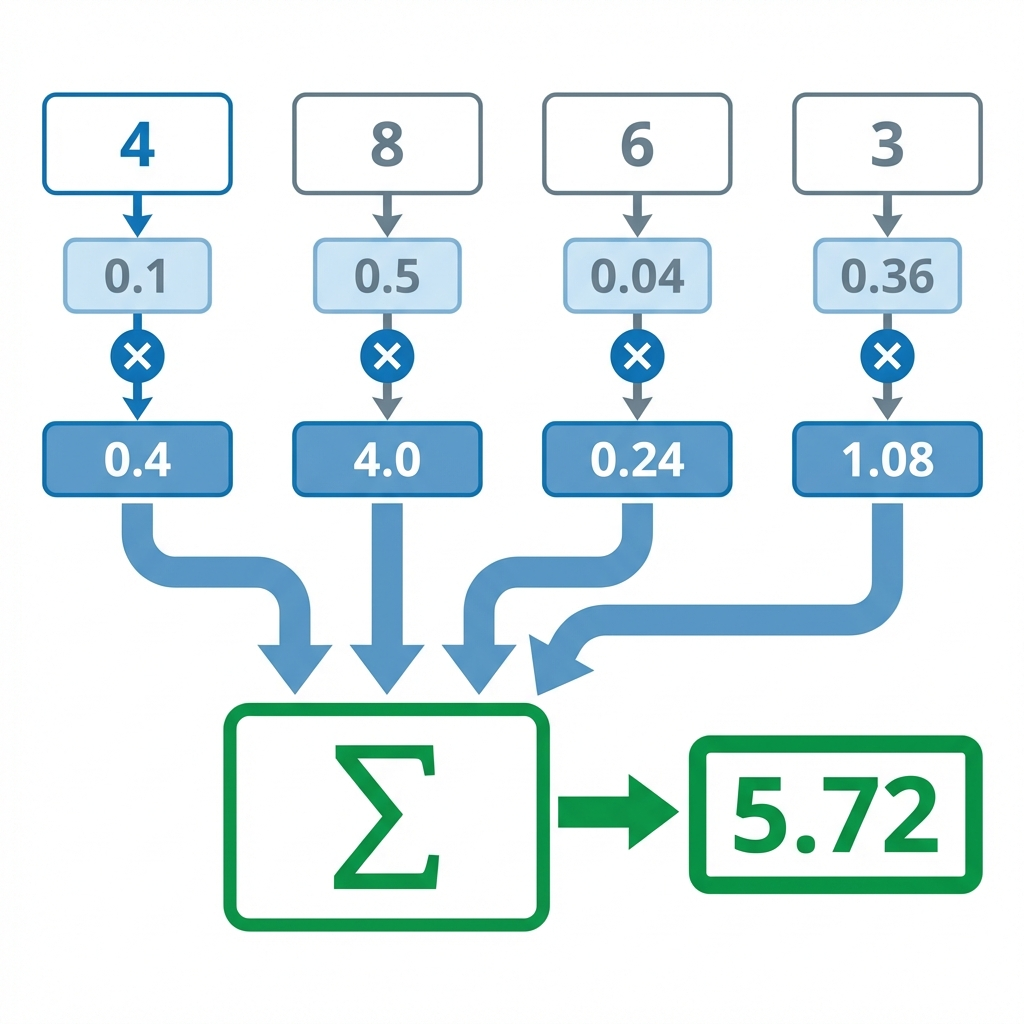
Given numbers: \(X = 4, 8, 6, 3\) with corresponding probabilities \(P(X) = 0.1, 0.5, 0.04, 0.36\).
Expected Value Formula:
\[ E(X) = \mu_X = \sum_{i=1}^{n} x_i \cdot P(x_i) = x_1P(x_1) + x_2P(x_2) + \dots + x_nP(x_n) \]
Step 1: Substitute the values:
\[ E(X) = (4)(0.1) + (8)(0.5) + (6)(0.04) + (3)(0.36) \]
Step 2: Multiply each term:
\[ E(X) = 0.4 + 4 + 0.24 + 1.08 \]
Step 3: Sum the results:
\[ E(X) = 5.72 \]
Final Answer: The expected value is \(E(X) = 5.72\).
How Our Expected Value Calculator Works?
- Input the different “Outcomes” and their associated “Probabilities” in the respective fields
- Press the “Add Row” button if you have more values to generate new rows
- Press the “Calculate” button and that's all, you will get the expected value, expected value table and a step-by-step calculation
References:
From the authorized source of Wikipedia : Definition and formula
From the source of Investopedia : General understanding of EV
Related Tools